


Your kitchen assistant

What’s for dinner? Just ask.

Nuven knows your pantry and what your family will eat, so dinner, the grocery list, and the week ahead come together in minutes.

Download on the App StoreGet it on Google Play
  • Available on iPhone & Android
  • English & Spanish
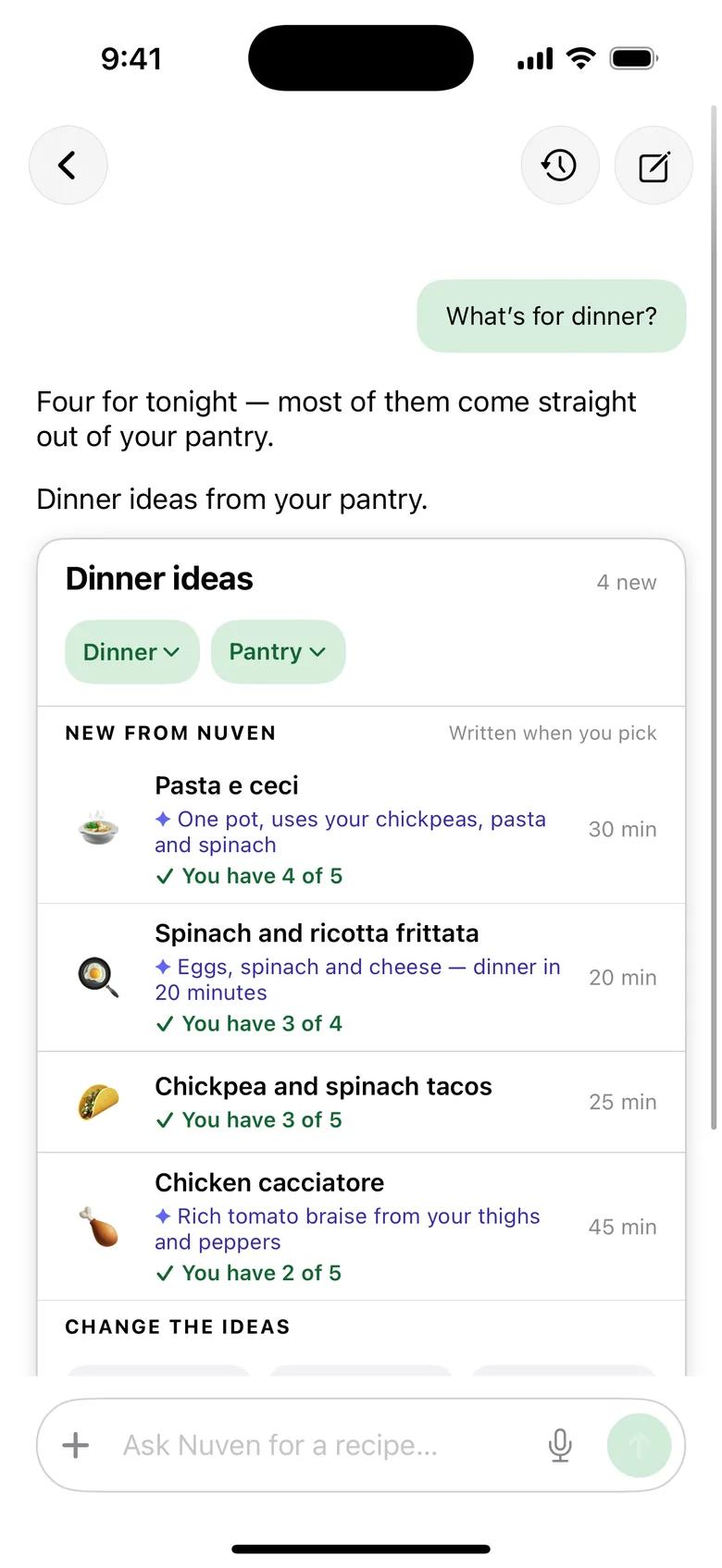
Nuven chat answering “What’s for dinner?” with four dinner ideas, each showing how many ingredients you already have.
Every family’s diets & allergies
Dinner ideas from your pantry
Weekly plans & grocery lists
On iPhone & Android

How it works

From fridge to table, in one evening.

01 · PANTRY

Snap your fridge. Nuven takes it from there.

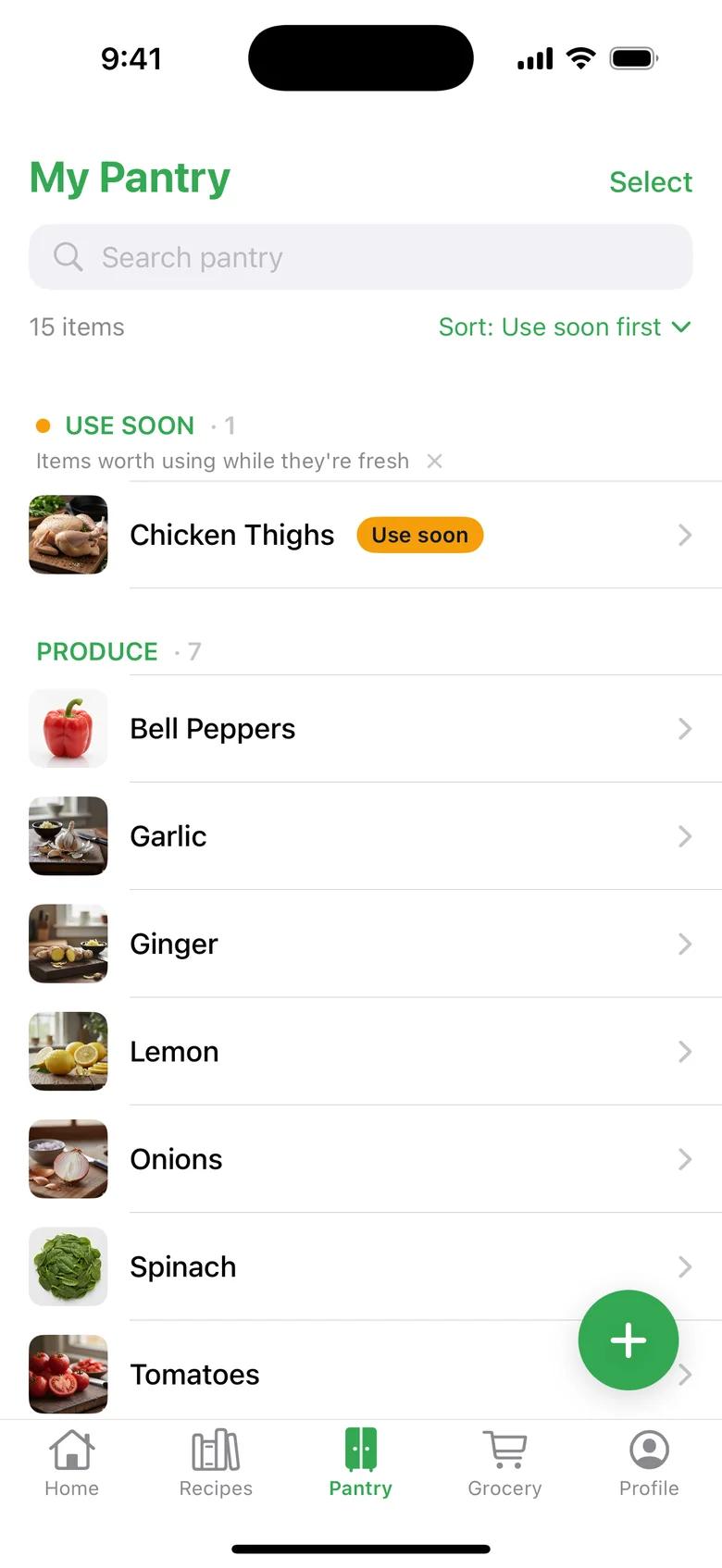
Take a photo of your fridge or a grocery receipt, check what Nuven found, and add it in one tap. Your pantry stays sorted, with what to use first at the top.

  • Photo or receipt scan, then a quick review
  • See what to use up first
Nuven pantry screen listing chicken thighs to use soon, then produce like bell peppers, garlic, ginger, lemon, onions and spinach.

02 · ASK

Ask the way you’d ask a friend.

“What’s for dinner?” “Something quick the kids will eat.” Nuven answers with a few ideas, ranked by what you already have.

  • A few ideas, best pantry match first
  • Respects every family member’s allergies
Nuven chat answering “What’s for dinner?” with four dinner ideas such as pasta e ceci and a spinach frittata, each showing how many ingredients you have.

03 · PLAN

The whole week, planned in one ask.

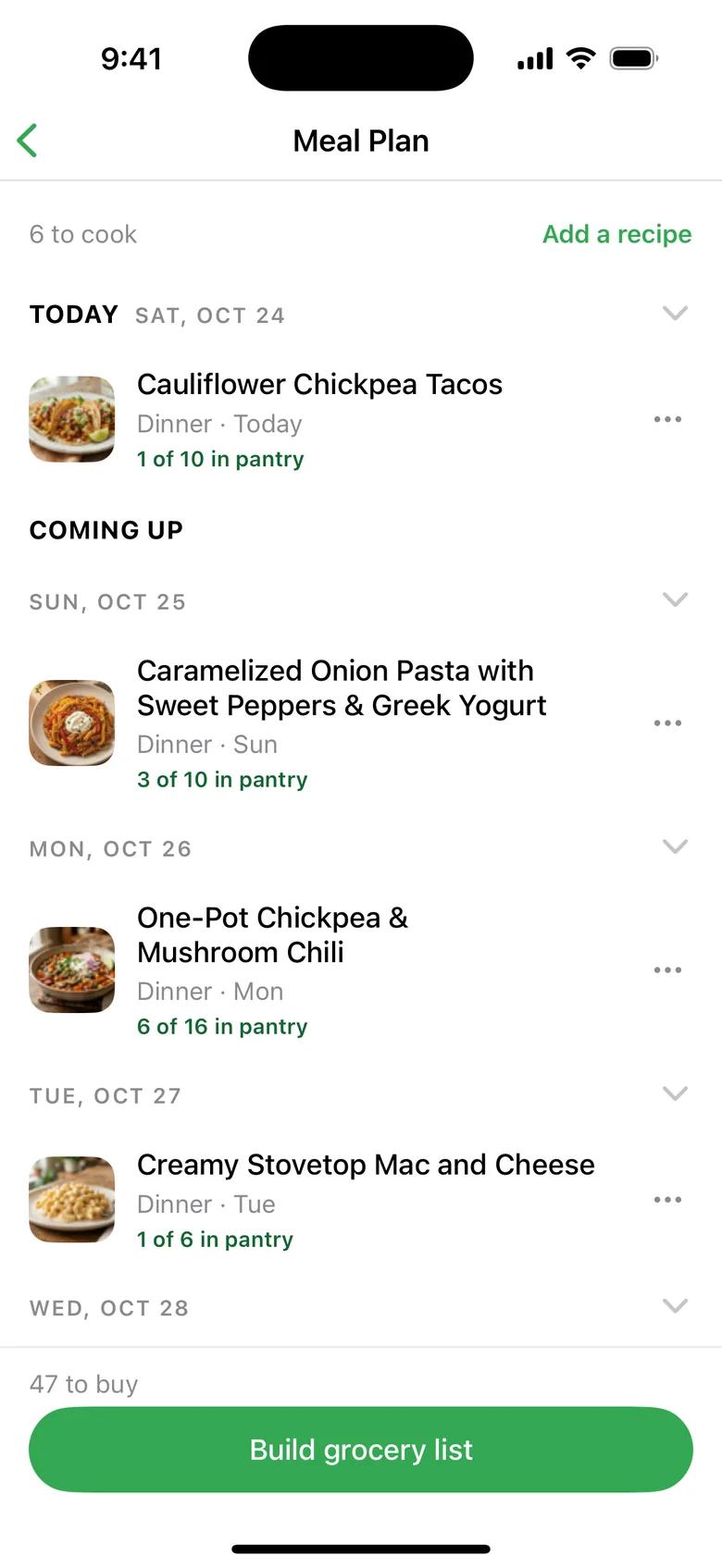
Say “plan my week” and Nuven lays out dinners around your pantry and your family’s tastes. Swap anything you don’t love.

  • A weekly plan you can edit
  • Built around what you already have
Nuven meal plan with a photo and a dinner for each day, such as cauliflower chickpea tacos and one-pot chickpea chili, with how many ingredients are already in the pantry.

04 · GROCERY

Only buy what you’re missing.

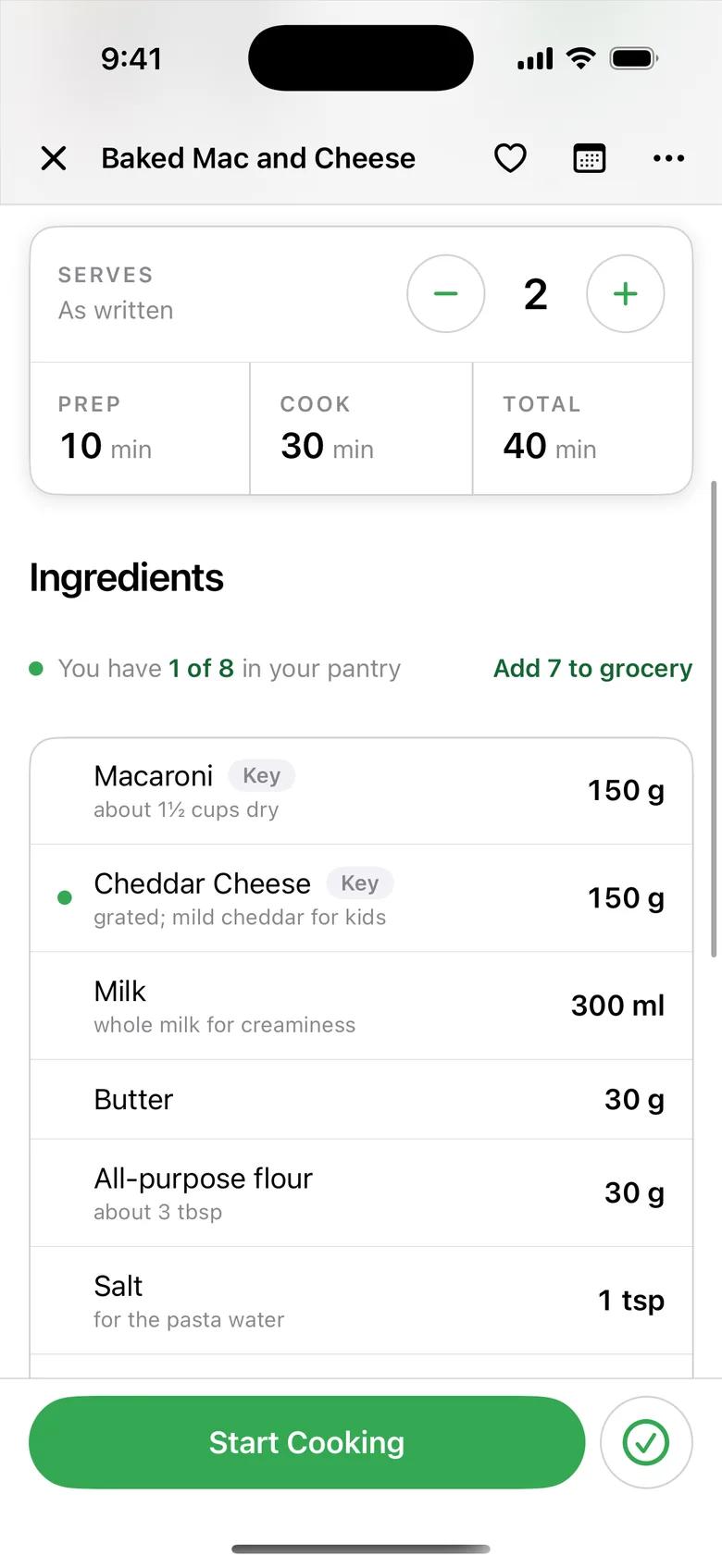
Every recipe shows what you already have. One tap adds the rest to your grocery list, grouped by aisle so the store run is quick.

  • “You have 1 of 8 · Add 7 to grocery”
  • Grouped by aisle
Nuven recipe for baked mac and cheese showing “You have 1 of 8 in your pantry” with an “Add 7 to grocery” button.

05 · COOK

Then just cook.

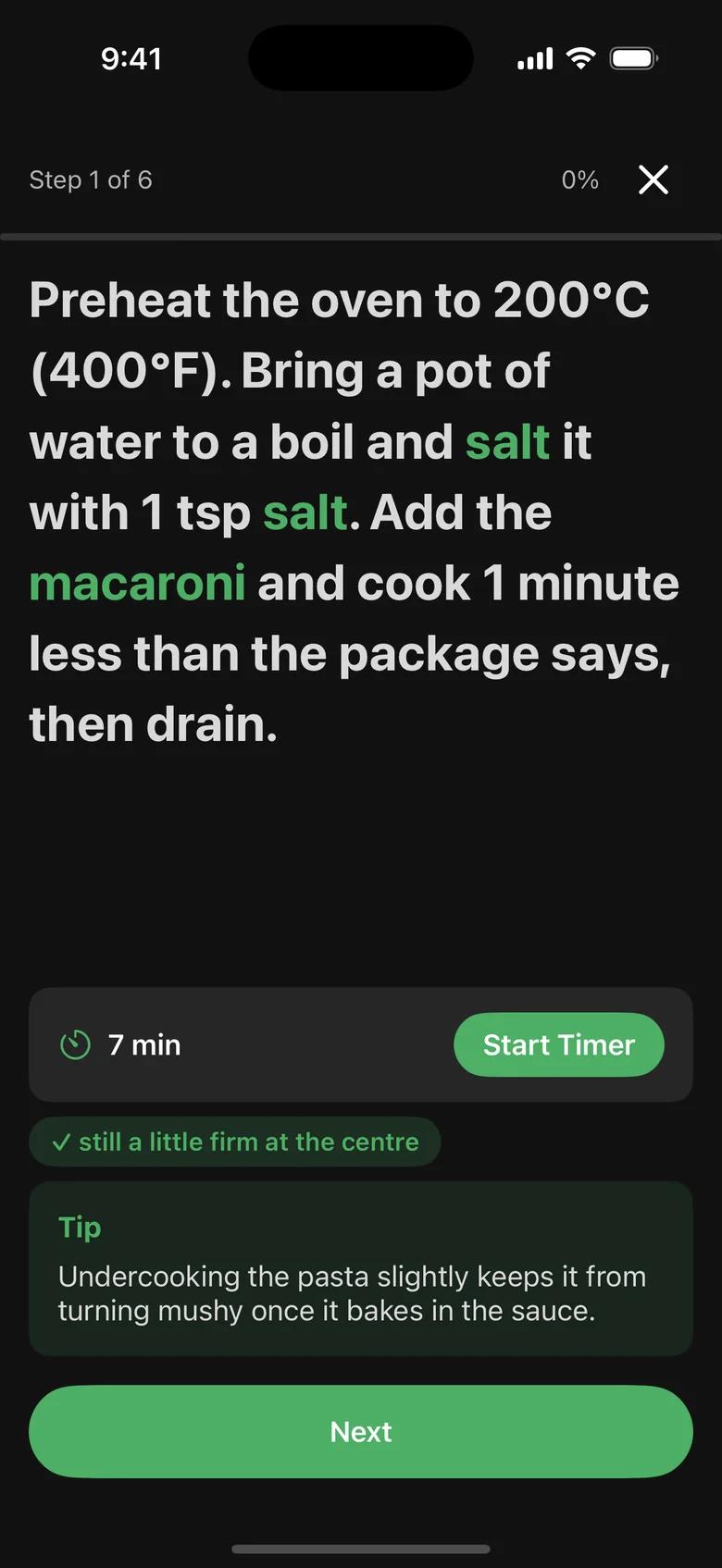
Cook Mode walks you through one step at a time, with timers built in, so you can keep your eyes on the pan.

  • One step at a time, big and readable
  • Timers right where you need them
Nuven Cook Mode showing step 1 of 6 in large type with a seven-minute timer button.

Built for families

One dinner. Everyone’s needs.

Tell Nuven who’s at the table: the vegetarian, the picky eater, the peanut allergy. Every suggestion accounts for all of them, and Nuven remembers so you don’t have to repeat yourself.

Tap who’s eating tonight

Sesame chicken noodles

25 min · serves 4 · you have 7 of 9

  • Chicken thighs
  • Noodles
  • Sesame oil
  • Garlic
  • Ginger
  • Spinach
  • Peanuts
  • Soy sauce
  • Lime

What Nuven remembers, and you can edit it anytime

Sam: peanut allergyJo: vegetarianWeeknights: under 30 minLoves: spicy

Example family. Always check labels for allergens.

Instagram

Share a reel, keep the recipe

Any website

Paste a link and skip the life story

Your favorites

Save the dinners your family loved

Something new

Ask Nuven to write one for tonight

Your cookbook, your way

All your recipes, finally in one place.

Bring in recipes from Instagram and any website. Nuven checks them against your pantry and your family, just like everything else.

How Nuven Helps

Built around your kitchen, not a search bar.

Deciding what to cook

What Nuven Does

Ask “what’s for dinner?” in your own words and get a few ideas ranked by what’s already in your kitchen.

What Other Apps Do

A search bar. You still have to know what you want before you open the app.

Your family

What Nuven Does

Remembers each person’s diet and allergies, including peanuts and tree nuts separately, and filters ideas for everyone at the table.

What Other Apps Do

One “vegetarian” toggle for the whole household.

Planning & groceries

What Nuven Does

Plan the week in one ask. Each recipe shows what you have, and one tap adds the rest to a list grouped by aisle.

What Other Apps Do

Pantry unaware. You check the cupboard yourself, every time.

Cooking

What Nuven Does

Cook Mode shows one step at a time in big type, with timers built in.

What Other Apps Do

A long page of ads and a recipe somewhere at the bottom.

Every kind of dinner

Whatever your family loves to eat.

  • Taco night
  • Sheet-pan chicken
  • Weeknight stir-fry
  • Pasta bake
  • Rajma chawal
  • Breakfast for dinner
  • Lunchbox wraps
  • Soup & grilled cheese
  • Fried rice
  • Chili
  • Dal & rice
  • Homemade pizza
  • Vegetarian
  • No peanuts
  • No dairy
  • 30 minutes or less

FAQ

Questions, answered.

  • What is Nuven?

    Nuven is a kitchen assistant for busy families. You ask what to cook in your own words, and it suggests dinners based on what is in your kitchen and who is eating, then helps you plan the week, build a grocery list, and cook step by step.

  • How does Nuven know what is in my kitchen?

    Snap a photo of your fridge or a grocery receipt, review what Nuven found, and add it. You can also add or remove items by hand anytime. You do not need to enter your whole pantry to get started.

  • Does it handle allergies and different diets?

    Yes. Add each family member’s diet and allergies once, including peanuts and tree nuts separately, and Nuven filters suggestions for everyone at the table. Always check ingredient labels for allergens.

  • How does the grocery list work?

    Every recipe shows how many ingredients you already have. One tap adds the rest to your grocery list, grouped by aisle.

  • Can I save recipes from Instagram or other websites?

    Yes. Share or paste a link from Instagram or a recipe website and Nuven saves the recipe, then checks it against your pantry and your family like everything else.

  • What devices and languages does Nuven support?

    Nuven is available on iPhone (iOS) and Android from the App Store or Google Play, in English and Spanish.

Tonight, just ask.

The kitchen assistant that knows your pantry and your family. Available on iPhone & Android.

Download on the App StoreGet it on Google Play